Your morning recovery score says how much your whole body can handle. The Training Lab, part of Pro, answers the next question: handle it where? A green morning does not mean your chest is ready to bench again if you hammered it yesterday. The Lab tracks recovery muscle by muscle, scores your strength over time, and gives you a full logging setup to feed it.
Per-muscle recovery
Every set you log deposits fatigue on the muscles it targets. The catalog behind this tags each exercise with the muscles it works, primary through tertiary, so a bench press lands most of its fatigue on the chest, a meaningful share on the front delts and triceps, and a little elsewhere. The same catalog powers the public training library if you want to see how exercises map to muscles.
Cardio counts too. Workouts arriving from HealthKit deposit lighter, sport-shaped fatigue: a run taxes your calves and posterior chain, a ride hammers your quads, a swim spreads load across the shoulders and back. Your legs know the difference between a rest day and a 20-kilometer run, and so does the map.
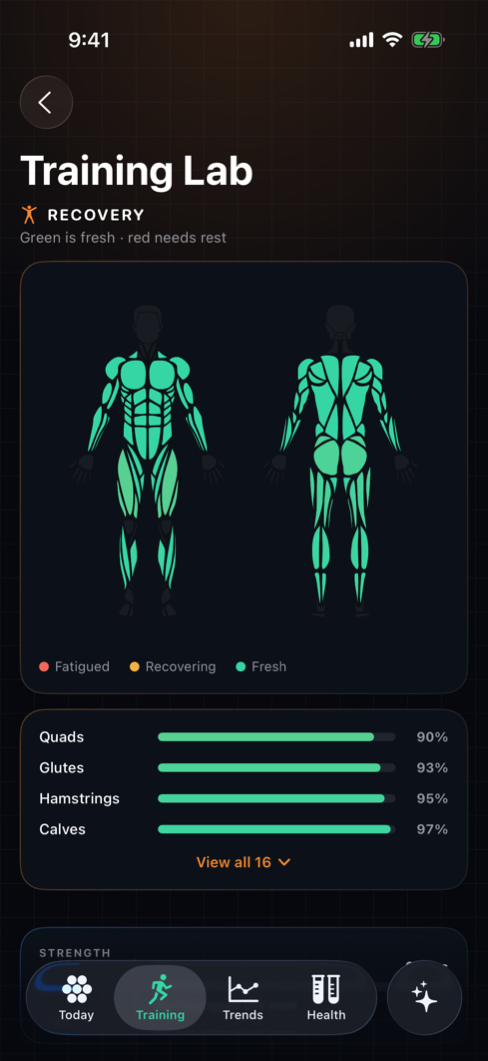
Fatigue then decays on muscle-specific windows. Big movers like quads and lats take about three days to fully clear; small muscles like biceps and calves bounce back in under two. The recovery map shows the result at a glance: which muscles are fresh, which are still carrying load, and therefore what today’s smartest session is.
Strength, scored
The Lab also keeps score. A relative strength index tracks how strong you are for your body weight, with trends broken out per muscle and per training split. Instead of a vague sense that the numbers are moving, you can see that your pull is climbing while your press has been flat for a month, and program accordingly.
Logging that feeds the engine
None of this works without logged sets, so the Lab makes logging fast:
- Rest timers that run between sets without leaving the logging screen.
- Last-performance hints, so the weight and reps you did last time are in front of you when deciding what to do this time.
- Templates for the sessions you repeat, ready to start in one tap.
- Gym profiles with equipment filtering. Tell Helix what each gym has and the exercise list filters to what that gym can actually do. The hotel gym profile stops suggesting a barbell the hotel does not own.
- Photo scans. Point the camera at a machine or a gym floor and Helix identifies the equipment for you.
- A month calendar showing your training history at a glance.
Logging a session, end to end
- 1
Start from a template or from scratch
Pick the template for today’s split, or start an empty session and add exercises as you go. If a gym profile is active, the exercise list is already filtered to its equipment. - 2
Log your sets
Enter weight and reps for each set. The last-performance hint shows what you did in this exercise last time, so progression is a decision, not an act of memory. - 3
Rest on the timer
Start the rest timer after a hard set and lift again when it says so, not when your phone gets boring. - 4
Finish and check the map
End the session and the fatigue lands on the muscles you worked. The recovery map now reflects today, and tomorrow it will tell you what has cleared.
Whole-body load from these sessions still counts toward your daily strain, and heavy training blocks show up in the next morning’s recovery score. The Lab is the muscle-level view of the same engine.