Helix runs entirely on data your devices already record, so setup is really one decision: what you let it read from Apple Health. This page walks the install, explains every permission on the sheet, and shows how to change your mind later.
What you need
- An iPhone. All scores are computed and stored there. No account, no sign-up.
- An Apple Watch, optionally. The watch is where the overnight vitals come from, so it unlocks the full recovery and strain experience. Helix still works without one; the with & without a watch page has the honest breakdown.
The setup flow
- 1
Install from the App Store
Search for Helix or use the download link on this site. There is no trial clock to start and nothing to register. - 2
Open the app
Onboarding begins with a short tour of what Helix does, then gets to the part that matters. - 3
Connect Apple Health
Helix asks early, on purpose: everything downstream depends on this data. Tapping through brings up the standard iOS Health permission sheet. - 4
Grant read access
Turn on all the categories, or use the option to enable everything at once. Helix only ever asks to read. - 5
Your profile fills itself in
Age, sex, height and weight are prefilled from Health where available, so you confirm rather than type.
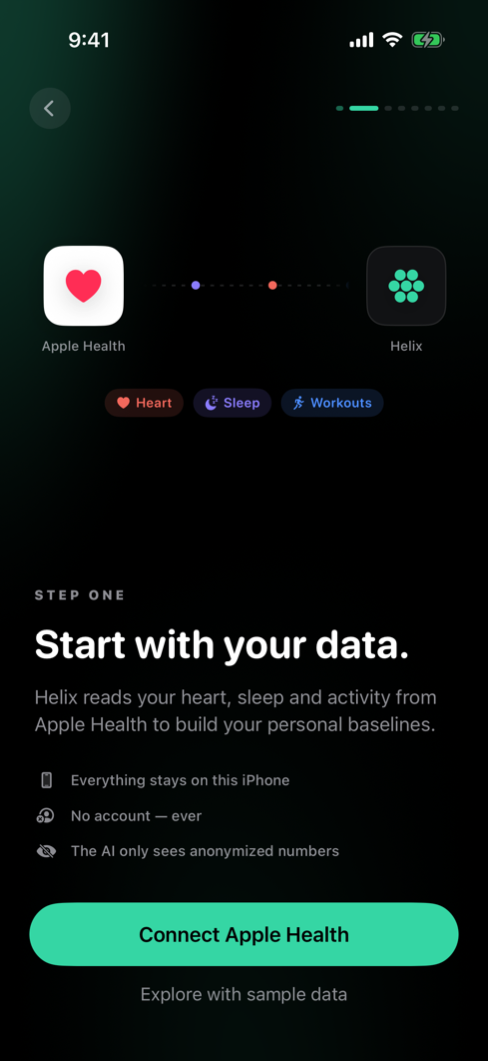
What Helix reads, and why
Every permission on the sheet maps to something you will see in the app. Nothing is collected for its own sake.
| Signal | What it powers |
|---|---|
| Heart rate variability | The core of the recovery score, read from your sleep window |
| Resting heart rate | Recovery; one of the clearest fatigue and illness signals |
| Respiratory rate | Recovery; very stable per person, so deviations mean something |
| Blood oxygen (SpO₂) | Recovery, where your watch records it |
| Wrist temperature | Recovery, on watches that measure it overnight |
| Sleep | Sleep stages, debt and regularity; the recovery score; day rollover at wake |
| Workouts | Strain, per-muscle fatigue from cardio, VO₂max tests |
| Active energy | The all-day portion of strain, beyond tracked workouts |
| Steps | Daily activity context for strain and trends |
| VO₂max | Your fitness trajectory and race predictions |
Grant everything, or grant some
We recommend turning it all on. Each signal is one more input Helix can weigh against your baselines, and the picture is sharpest when the picture is complete.
If you skip a category, Helix degrades gracefully rather than guessing. A signal you did not grant shows as missing, not as an invented number, and your scores lean on the signals that do exist. You will simply see less: skip sleep and there is no morning score at all; skip workouts and strain cannot see your training.
Fixing permissions later
Changed your mind, or skipped something during onboarding? iOS owns these switches, so you flip them in two places:
- Settings app→ Privacy & Security → Health → Helix, then turn on the categories you want.
- Health app→ your profile → Apps & Services → Helix, which shows the same switches from the Health side.
Helix picks up newly granted data the next time it refreshes; there is nothing to reinstall or reset.
The notification ask comes later
Helix also sends a daily morning report and post-workout summaries, which needs the separate iOS notification permission. That ask is deliberately not bundled with the Health one: the Health sheet is a big decision, and stacking permission dialogs is how apps get reflexive noes. Helix asks about notifications near the end of onboarding, once you have seen what the morning report would contain.
With permissions granted, the next thing that happens is your first tracked night. Your first morning covers exactly what you will wake up to.